请提供接入这款显示器后的以下信息
cat ./sys/kernel/debug/drm_dp/dpcd
1.电脑端读取EDID工具 EnTech Taiwan | Utilities | Monitor Asset Manager
2.电脑读取明基EDID(TYPEC转DP)
Monitor
Model name… BenQ PD2706U
Manufacturer… BenQ
Plug and Play ID… BNQ8048
Serial number… ET63R01050CL0
Manufacture date… 2024, ISO week 11
Filter driver… None
EDID revision… 1.4
Input signal type… Digital (DisplayPort)
Color bit depth… 10 bits per primary color
Color encoding formats… RGB 4:4:4, YCrCb 4:4:4, YCrCb 4:2:2
Screen size… 600 x 340 mm (27.2 in)
Power management… Active off/sleep
Extension blocs… 1 (CEA/CTA-EXT)
DDC/CI… n/a
Color characteristics
Default color space… Non-sRGB
Display gamma… 2.20
Red chromaticity… Rx 0.681 - Ry 0.316
Green chromaticity… Gx 0.258 - Gy 0.676
Blue chromaticity… Bx 0.150 - By 0.062
White point (default)… Wx 0.313 - Wy 0.329
Additional descriptors… None
Timing characteristics
Horizontal scan range… 27-135kHz
Vertical scan range… 24-76Hz
Video bandwidth… 600MHz
CVT standard… Not supported
GTF standard… Not supported
Additional descriptors… None
Preferred timing… Yes
Native/preferred timing… 3840x2160p at 60Hz (16:9)
Modeline… “3840x2160” 533.250 3840 3888 3920 4000 2160 2163 2168 2222 +hsync -vsync
Standard timings supported
720 x 400p at 70Hz - IBM VGA
640 x 480p at 60Hz - IBM VGA
640 x 480p at 75Hz - VESA
800 x 600p at 60Hz - VESA
800 x 600p at 75Hz - VESA
832 x 624p at 75Hz - Apple Mac II
1024 x 768p at 60Hz - VESA
1024 x 768p at 75Hz - VESA
1280 x 1024p at 75Hz - VESA
1152 x 870p at 75Hz - Apple Mac II
1920 x 1080p at 60Hz - VESA STD
1280 x 720p at 60Hz - VESA STD
1280 x 800p at 60Hz - VESA STD
1280 x 1024p at 60Hz - VESA STD
1600 x 900p at 60Hz - VESA STD
1680 x 1050p at 60Hz - VESA STD
EIA/CEA/CTA-861 Information
Revision number… 3
IT underscan… Supported
Basic audio… Supported
YCbCr 4:4:4… Supported
YCbCr 4:2:2… Supported
Native formats… 0
Detailed timing #1… 2560x1440p at 60Hz (16:9)
Modeline… “2560x1440” 241.500 2560 2608 2640 2720 1440 1443 1448 1481 +hsync -vsync
CE video identifiers (VICs) - timing/formats supported
“2560x1440” 241.500 2560 2608 2640 2720 1440 1443 1448 1481 +hsync -vsync
“2560x1440” 241.500 2560 2608 2640 2720 1440 1443 1448 1481 +hsync -vsync
“2560x1440” 241.500 2560 2608 2640 2720 1440 1443 1448 1481 +hsync -vsync
“2560x1440” 241.500 2560 2608 2640 2720 1440 1443 1448 1481 +hsync -vsync
“2560x1440” 241.500 2560 2608 2640 2720 1440 1443 1448 1481 +hsync -vsync
1920 x 1080p at 60Hz - HDTV (16:9, 1:1)
1920 x 1080p at 50Hz - HDTV (16:9, 1:1)
1920 x 1080p at 30Hz - HDTV (16:9, 1:1)
1920 x 1080p at 25Hz - HDTV (16:9, 1:1)
1920 x 1080p at 24Hz - HDTV (16:9, 1:1)
1280 x 720p at 60Hz - HDTV (16:9, 1:1)
1280 x 720p at 50Hz - HDTV (16:9, 1:1)
720 x 576p at 50Hz - EDTV (16:9, 64:45)
720 x 576p at 50Hz - EDTV (4:3, 16:15)
720 x 480p at 60Hz - EDTV (16:9, 32:27)
720 x 480p at 60Hz - EDTV (4:3, 8:9)
640 x 480p at 60Hz - Default (4:3, 1:1)
NB: NTSC refresh rate = (Hz*1000)/1001
CE audio data (formats supported)
LPCM 2-channel, 16/20/24 bit depths at 32/44/48 kHz
CE speaker allocation data
Channel configuration… 2.0
Front left/right… Yes
Front LFE… No
Front center… No
Rear left/right… No
Rear center… No
Front left/right center… No
Rear left/right center… No
Rear LFE… No
CE vendor specific data (VSDB)
IEEE registration number. 0x000C03
CEC physical address… 1.0.0.0
Supports AI (ACP, ISRC)… No
Supports 48bpp… No
Supports 36bpp… Yes
Supports 30bpp… Yes
Supports YCbCr 4:4:4… Yes
Supports dual-link DVI… No
Maximum TMDS clock… 600MHz
HDR static metadata
SDR luminance… Yes
HDR luminance… No
SMPTE ST2084… Yes
Hybrid log… No
Data payload… 060501666600
CE colorimetry data
xvYCC601 support… Yes
xvYCC709 support… Yes
sYCC601 support… No
AdobeYCC601 support… No
AdobeRGB support… No
BT2020CYCC support… No
BT2020YCC support… Yes
BT2020RGB support… Yes
Metadata profile flags… 0x00
CE video capability data
CE scan behavior… Supports overscan and underscan
IT scan behavior… Supports overscan and underscan
PT scan behavior… Not supported
RGB quantization range… Selectable (via AVI YQ)
YCC quantization range… Selectable (via AVI YQ)
Report information
Date generated… 2025/5/13
Software revision… 2.91.0.1043
Data source… File - NB: improperly installed
Operating system… 10.0.22631.2
Raw data
00,FF,FF,FF,FF,FF,FF,00,09,D1,48,80,00,00,00,00,0B,22,01,04,B5,3C,22,78,3A,40,B5,AE,51,42,AD,26,
0F,50,54,A5,6B,80,D1,C0,81,C0,81,00,81,80,A9,C0,B3,00,01,01,01,01,4D,D0,00,A0,F0,70,3E,80,30,20,
35,00,55,50,21,00,00,1A,00,00,00,FF,00,45,54,36,33,52,30,31,30,35,30,43,4C,30,00,00,00,FD,00,18,
4C,1B,87,3C,00,0A,20,20,20,20,20,20,00,00,00,FC,00,42,65,6E,51,20,50,44,32,37,30,36,55,0A,01,17,
02,03,34,F0,51,61,60,5F,5E,5D,10,1F,22,21,20,04,13,12,11,03,02,01,23,09,07,07,83,01,00,00,67,03,
0C,00,10,00,38,78,E6,06,05,01,66,66,00,E3,05,C3,00,E2,00,CF,56,5E,00,A0,A0,A0,29,50,30,20,35,00,
55,50,21,00,00,1A,00,00,00,00,00,00,00,00,00,00,00,00,00,00,00,00,00,00,00,00,00,00,00,00,00,00,
00,00,00,00,00,00,00,00,00,00,00,00,00,00,00,00,00,00,00,00,00,00,00,00,00,00,00,00,00,00,00,59
rubikpi板子连接显示器后,执行下列命令,并将结果上传
adb root
adb shell
cat ./sys/kernel/debug/drm_dp/dpcd
@RUBIKPi:~$ adb version
Android Debug Bridge version 1.0.41
Version 34.0.5-debian
Installed as /usr/lib/android-sdk/platform-tools/adb
Running on Linux 6.6.38 (aarch64)
@RUBIKPi:~$ adb root
- daemon not running; starting now at tcp:5037
- daemon started successfully
adb: unable to connect for root: no devices/emulators found
@RUBIKPi:~$ adb shell
adb: no devices/emulators found
@RUBIKPi:~$ cat ./sys/kernel/debug/drm_dp/dpcd
cat: ./sys/kernel/debug/drm_dp/dpcd: 没有那个文件或目录
@RUBIKPi:~$ cat /sys/kernel/debug/drm_dp/dpcd
cat: /sys/kernel/debug/drm_dp/dpcd: 权限不够
bitech@RUBIKPi:~$ sudo -i
root@RUBIKPi:~# adb root
adb: unable to connect for root: no devices/emulators found
root@RUBIKPi:~# cat ./sys/kernel/debug/drm_dp/dpcd
cat: ./sys/kernel/debug/drm_dp/dpcd: 没有那个文件或目录
root@RUBIKPi:~# cat /sys/kernel/debug/drm_dp/dpcd
0000: 14 14 c4 01 01 00 01 80 02 00 06 00 00 00 80 00 00 00 00 00 root@RUBIKPi:~#
adb root
adb shell
cat ./sys/kernel/debug/drm_dp/dpcd
echo -n "file dp_aux.c +p" > /sys/kernel/debug/dynamic_debug/control
cat /sys/kernel/debug/drm_dp/edid_modes
以上命令在DEBIAN12发了无效解析DPCD链路状态:通道0、2、3状态良好,通道1状态未知。
我们的设备要么2 lane模式,要么4 lane模式。
2 lane 最大支持分辨率4K30。
所以应该和内核有关,QSC6490 官方datasheet:4K 60hz。
我司测试确实支持支持4lane,4k60,但不清楚你这个显示器为什么有个通道异常。displayport本来就会受多种外部因素影响,有什么依据会怀疑到内核呢?
我用的线:
【淘宝】假一赔四 https://e.tb.cn/h.6JJrCtWxz3O2g28?tk=5wIIV7JnLeq HU071 「Type-C转DP2.1线16K超高清4K240Hz/2K360Hz游戏高刷笔记本雷电4/3电脑USB-C显卡外接显示器displayport接口」
点击链接直接打开 或者 淘宝搜索直接打开
同样的线连接到电脑上没问题,只有连接在这个PCBA上显示30hZ,关键问题是PCBA我用HDMI接口的线,也只有30HZ,HDMI都是认证过的。
HDMI 本来最高分辨率就是4K30。
关于客户遇到的Displayport问题,可以帮忙将你这边所有遇到问题的显示器完整型号分享给我们,我将同步到DEV team进行评估,看是否有改善方案。
Debian 12 Type-C to DP cannot properly output display according to EDID. · Issue #8 · rubikpi-ai/linux · GitHub 链接: [RUBIK Pi3.docx] 写了一些可能性。
2880x1620 60hz,电脑读出:
Monitor
Model name… 2880x1620 CVT
Windows description… Generic PnP Monitor
Manufacturer… ANW
Plug and Play ID… ANW0000
Serial number… n/a
Manufacture date… 2025, ISO week 255
Filter driver… None
EDID revision… 1.4
Input signal type… Digital (DisplayPort)
Color bit depth… 8 bits per primary color
Color encoding formats… RGB 4:4:4
Screen size… 500 x 310 mm (23.2 in)
Power management… Not supported
Extension blocs… 1 (Data unavailable)
DDC/CI… n/a
Color characteristics
Default color space… sRGB
Display gamma… 2.20
Red chromaticity… Rx 0.640 - Ry 0.330
Green chromaticity… Gx 0.300 - Gy 0.600
Blue chromaticity… Bx 0.150 - By 0.060
White point (default)… Wx 0.313 - Wy 0.329
Additional descriptors… None
Timing characteristics
Horizontal scan range… 15-255kHz
Vertical scan range… 23-240Hz
Video bandwidth… 400MHz
CVT standard… Not supported
GTF standard… Supported
Additional descriptors… None
Preferred timing… Yes
Native/preferred timing… 2880x1620p at 60Hz
Modeline… “2880x1620” 297.440 2880 2944 2976 3008 1620 1636 1642 1648 +hsync +vsync
Standard timings supported
Report information
Date generated… 2025/5/15
Software revision… 2.91.0.1043
Data source… Registry-Active
Operating system… 10.0.19045.2
Raw data
00,FF,FF,FF,FF,FF,FF,00,05,D7,00,00,00,00,00,00,FF,23,01,04,A5,32,1F,78,07,EE,95,A3,54,4C,99,26,
0F,50,54,00,00,00,01,01,01,01,01,01,01,01,01,01,01,01,01,01,01,01,30,74,40,80,B0,54,1C,60,40,20,
06,04,00,00,00,00,00,1E,00,00,00,FD,00,17,F0,0F,FF,28,00,0A,20,20,20,20,20,20,00,00,00,FC,00,32,
38,38,30,78,31,36,32,30,20,43,56,54,00,00,00,00,00,00,00,00,00,00,00,00,00,00,00,00,00,00,01,B9
rubikpi :点不亮
bitech@RUBIKPi:~$ sudo -i
root@RUBIKPi:~# cat /sys/devices/platform/soc@0/ae00000.qcom,mdss_mdp0/drm/card0/card0-DP-1/edid | hexdump -C | sed ‘s/.: ([0-9a-f ]) .*/\1/g’
00000000 00 ff ff ff ff ff ff 00 05 d7 00 00 00 00 00 00 |…|
00000010 ff 23 01 04 a5 32 1f 78 07 ee 95 a3 54 4c 99 26 |.#…2.x…TL.&|
00000020 0f 50 54 00 00 00 01 01 01 01 01 01 01 01 01 01 |.PT…|
00000030 01 01 01 01 01 01 30 74 40 80 b0 54 1c 60 40 20 |…0t@…T.`@ |
00000040 06 04 00 00 00 00 00 1e 00 00 00 fd 00 17 f0 0f |…|
00000050 ff 28 00 0a 20 20 20 20 20 20 00 00 00 fc 00 32 |.(… …2|
00000060 38 38 30 78 31 36 32 30 20 43 56 54 00 00 00 00 |880x1620 CVT…|
00000070 00 00 00 00 00 00 00 00 00 00 00 00 00 00 00 ba |…|
00000080
root@RUBIKPi:~# cat /sys/kernel/debug/drm_dp/edid_modes
1680x945 60 0 2240 978 131481 0x6
1400x1050 60 0 1864 1089 121750 0x6
1600x900 60 0 1800 1000 108000 0x5
1280x1024 75 0 1688 1066 135000 0x5
1280x1024 60 0 1688 1066 108000 0x5
1440x900 75 0 1936 942 136750 0x6
1440x900 60 0 1904 934 106500 0x6
1280x960 60 0 1800 1000 108000 0x5
1366x768 60 0 1792 798 85500 0x5
1360x768 60 0 1792 795 85500 0x5
1280x800 85 0 1712 843 122500 0x6
1280x800 75 0 1696 838 106500 0x6
1280x800 60 0 1680 831 83500 0x6
1152x864 75 0 1600 900 108000 0x5
1280x768 85 0 1712 809 117500 0x6
1280x768 75 0 1696 805 102250 0x6
1280x768 60 0 1664 798 79500 0x6
1280x720 60 0 1650 750 74250 0x5
1024x768 85 0 1376 808 94500 0x5
1024x768 75 0 1312 800 78750 0x5
1024x768 70 0 1328 806 75000 0xa
1024x768 60 0 1344 806 65000 0xa
1024x576 60 0 1312 597 46970 0x6
800x600 85 0 1048 631 56250 0x5
800x600 75 0 1056 625 49500 0x5
800x600 72 0 1040 666 50000 0x5
800x600 60 0 1056 628 40000 0x5
800x600 56 0 1024 625 36000 0x5
848x480 60 0 1088 517 33750 0x5
640x480 85 0 832 509 36000 0xa
640x480 75 0 840 500 31500 0xa
640x480 73 0 832 520 31500 0xa
640x480 60 0 800 525 25175 0xa
720x400 85 0 936 446 35500 0x6
640x400 85 0 832 445 31500 0x6
640x350 85 0 832 445 31500 0x9
root@RUBIKPi:~# cat /sys/kernel/debug/drm_dp/dpcd
0000: 14 0a c4 81 01 00 01 00 02 1f 04 07 38 00 84 00 00 00 00 00 root@RUBIKPi:~#
2560x1440 55hz,电脑读出:
Monitor
Model name… Lingpao14.6
Windows description… Generic PnP Monitor
Manufacturer… ESW
Plug and Play ID… ESW0146
Serial number… MAX19201080NC-1920108060
Manufacture date… 2016, ISO week 28
Filter driver… None
EDID revision… 1.4
Input signal type… Digital (DisplayPort)
Color bit depth… 8 bits per primary color
Color encoding formats… RGB 4:4:4, YCrCb 4:4:4
Screen size… 480 x 270 mm (21.7 in)
Power management… Active off/sleep
Extension blocs… None
DDC/CI… n/a
Color characteristics
Default color space… Non-sRGB
Display gamma… 2.20
Red chromaticity… Rx 0.633 - Ry 0.334
Green chromaticity… Gx 0.300 - Gy 0.615
Blue chromaticity… Bx 0.151 - By 0.071
White point (default)… Wx 0.313 - Wy 0.329
Additional descriptors… None
Timing characteristics
Horizontal scan range… 81-82kHz
Vertical scan range… 55-56Hz
Video bandwidth… 230MHz
CVT standard… Not supported
GTF standard… Not supported
Additional descriptors… None
Preferred timing… Yes
Native/preferred timing… 2560x1440p at 55Hz (16:9)
Modeline… “2560x1440” 230.130 2560 2624 2720 2816 1440 1472 1473 1480 +hsync +vsync
Standard timings supported
Report information
Date generated… 2025/5/15
Software revision… 2.91.0.1043
Data source… Registry-Active
Operating system… 10.0.19045.2
Raw data
00,FF,FF,FF,FF,FF,FF,00,16,77,46,01,1C,86,72,72,1C,1A,01,04,A5,30,1B,78,2A,2E,D5,A2,55,4C,9D,26,
12,50,54,00,00,00,01,01,01,01,01,01,01,01,01,01,01,01,01,01,01,01,E5,59,00,00,A1,A0,28,50,40,60,
01,08,DD,0C,11,00,00,1E,00,00,00,FD,00,37,38,51,52,17,00,0A,20,20,20,20,20,20,00,00,00,FC,00,4C,
69,6E,67,70,61,6F,31,34,2E,36,0A,20,00,00,00,FF,00,4D,41,58,31,39,32,30,31,30,38,30,4E,43,00,A4
RUBIKPi 在不连接HDMI时可以正常点亮
bitech@RUBIKPi:~$ sudo -i
root@RUBIKPi:~# cat /sys/devices/platform/soc@0/ae00000.qcom,mdss_mdp0/drm/card0/card0-DP-1/edid | hexdump -C | sed 's/.: ([0-9a-f ]) ./\1/g’
00000000 00 ff ff ff ff ff ff 00 16 77 46 01 1c 86 72 72 |…wF…rr|
00000010 1c 1a 01 04 a5 30 1b 78 2a 2e d5 a2 55 4c 9d 26 |…0.x…UL.&|
00000020 12 50 54 00 00 00 01 01 01 01 01 01 01 01 01 01 |.PT…|
00000030 01 01 01 01 01 01 e5 59 00 00 a1 a0 28 50 40 60 |…Y…(P@`|
00000040 01 08 dd 0c 11 00 00 1e 00 00 00 fd 00 37 38 51 |…78Q|
00000050 52 17 00 0a 20 20 20 20 20 20 00 00 00 fc 00 4c |R… …L|
00000060 69 6e 67 70 61 6f 31 34 2e 36 0a 20 00 00 00 ff |ingpao14.6. …|
00000070 00 4d 41 58 31 39 32 30 31 30 38 30 4e 43 00 a4 |.MAX19201080NC…|
00000080
root@RUBIKPi:~# cat /sys/kernel/debug/drm_dp/edid_modes
2560x1440 55 0 2816 1480 230130 0x5
root@RUBIKPi:~# cat /sys/kernel/debug/drm_dp/dpcd
0000: 14 0a c4 81 01 00 01 00 02 1f 04 07 38 00 84 00 00 00 00 00 root@RUBIKPi:~#
RUBIK Pi3.docx中提到的猜想:
猜想:Typec 既要刷软件,又要显示,是不是只用了2lanes,能在新的系统上内核驱动支持,仅通过设备树配置更改吗?
我们很清楚您说的意思,但不用往这方面考虑。接DP时4lane全用,不然我们自己测试4k60不可能成功。
rubikpi debian版本DP支持4k 60Hz,这是确定无疑的,我实测过,下面这个图片就是我实测拍的。
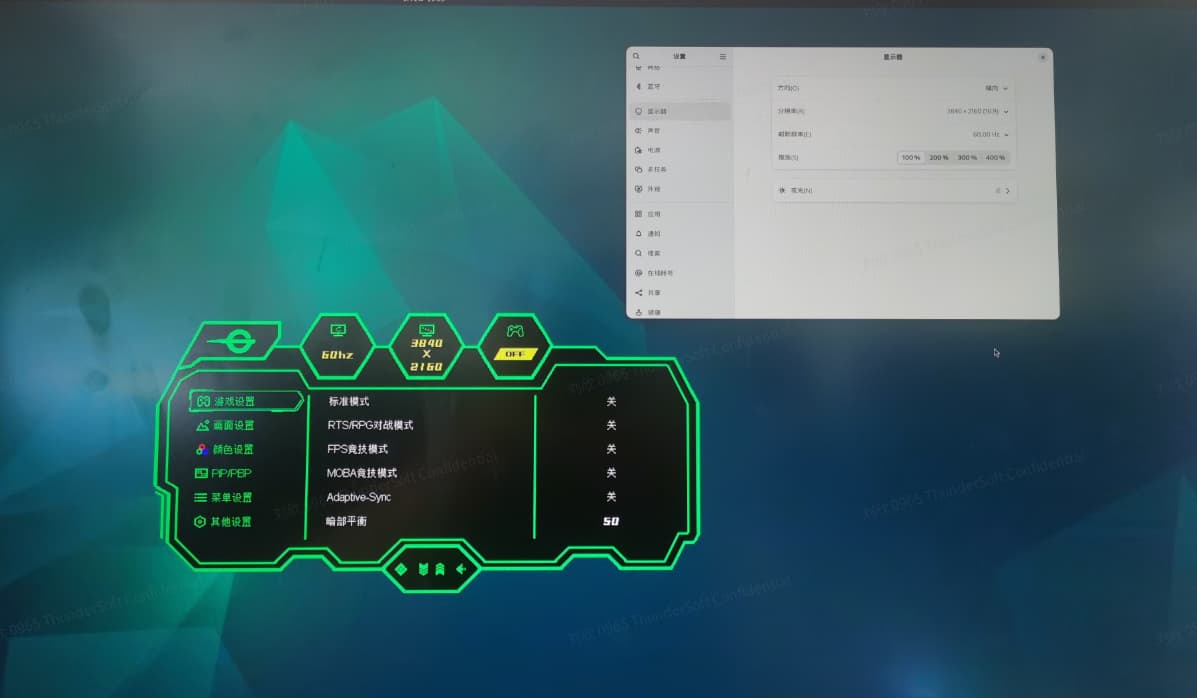
当然您的显示器4k60问题也是客观存在的,因此我们考虑的还是兼容性方面的问题。
请问客户用的DP线的长度是多少?
有使用过其他厂牌的线吗?有用过短些的线吗?
还有可以考虑测试带增强或补偿类redriver方案的转接器。
下图仅为示例,没有实际测量过。
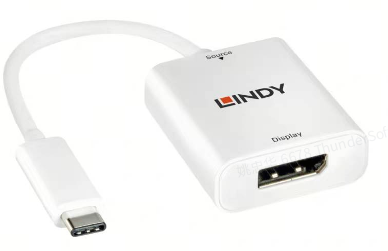
Typec 转DP线 1m长
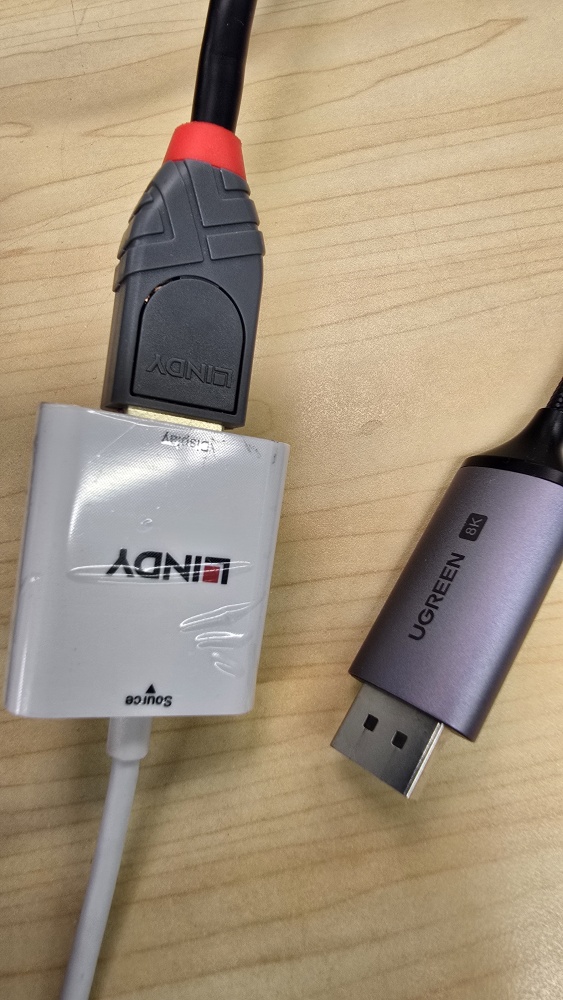
我用多种DP线都会存在点不亮的情况
这是华为的显示屏:
Monitor
Model name… SSN-24
Windows description… Generic PnP Monitor
Manufacturer… HWV
Plug and Play ID… HWV6E4E
Serial number… -16777216
Manufacture date… 2022, ISO week 42
Filter driver… None
EDID revision… 1.3
Input signal type… Digital
Color bit depth… Undefined
Display type… RGB color
Screen size… 530 x 300 mm (24.0 in)
Power management… Active off/sleep
Extension blocs… 1 (Unknown type)
DDC/CI… n/a
Color characteristics
Default color space… Non-sRGB
Display gamma… 2.20
Red chromaticity… Rx 0.669 - Ry 0.321
Green chromaticity… Gx 0.280 - Gy 0.662
Blue chromaticity… Bx 0.154 - By 0.056
White point (default)… Wx 0.313 - Wy 0.329
Additional descriptors… None
Timing characteristics
Horizontal scan range… 15-85kHz
Vertical scan range… 48-76Hz
Video bandwidth… 180MHz
CVT standard… Not supported
GTF standard… Not supported
Additional descriptors… None
Preferred timing… Yes
Native/preferred timing.. 1920x1080p at 60Hz (16:9)
Modeline… “1920x1080” 148.500 1920 2008 2052 2200 1080 1084 1089 1125 +hsync +vsync
Standard timings supported
720 x 400p at 70Hz - IBM VGA
640 x 480p at 60Hz - IBM VGA
640 x 480p at 75Hz - VESA
800 x 600p at 60Hz - VESA
800 x 600p at 75Hz - VESA
1024 x 768p at 60Hz - VESA
1024 x 768p at 75Hz - VESA
1280 x 1024p at 75Hz - VESA
1280 x 1024p at 60Hz - VESA STD
1600 x 900p at 60Hz - VESA STD
1152 x 864p at 75Hz - VESA STD
Report information
Date generated… 2025/5/19
Software revision… 2.91.0.1043
Data source… Registry-Active - NB: improperly installed
Operating system… 10.0.19045.2
Raw data
00,FF,FF,FF,FF,FF,FF,00,22,F6,4E,6E,00,00,00,01,2A,20,01,03,80,35,1E,78,2A,5E,95,AB,52,47,A9,27,
0E,50,54,A5,4B,00,81,80,A9,C0,71,4F,01,01,01,01,01,01,01,01,01,01,02,3A,80,18,71,38,2D,40,58,2C,
45,00,0F,28,21,00,00,1E,00,00,00,FF,00,20,20,20,20,20,20,20,20,20,20,20,20,20,00,00,00,FD,00,30,
4C,0F,55,12,00,0A,20,20,20,20,20,20,00,00,00,FC,00,53,53,4E,2D,32,34,0A,20,20,20,20,20,20,01,C2
Dear customer,
在今天的通话中,我们有讨论到客户遇到DP问题的场景细节。
在输出到常规显示器时,基本都能正常显示。
遇到问题的显示器主要是客户自己生产的屏,这种屏支持EDID写入。
后续我们的研发团队可能会评估搭建测试case,客户可以推荐下详细测试方法,帮助我们复现问题。